



售前咨询
快手万擎(Vanchin)
LLM-Rec 挑战赛 · 开发机使用指南
更新时间:2026-07-31 19:54:37
开发机使用地址:开发机
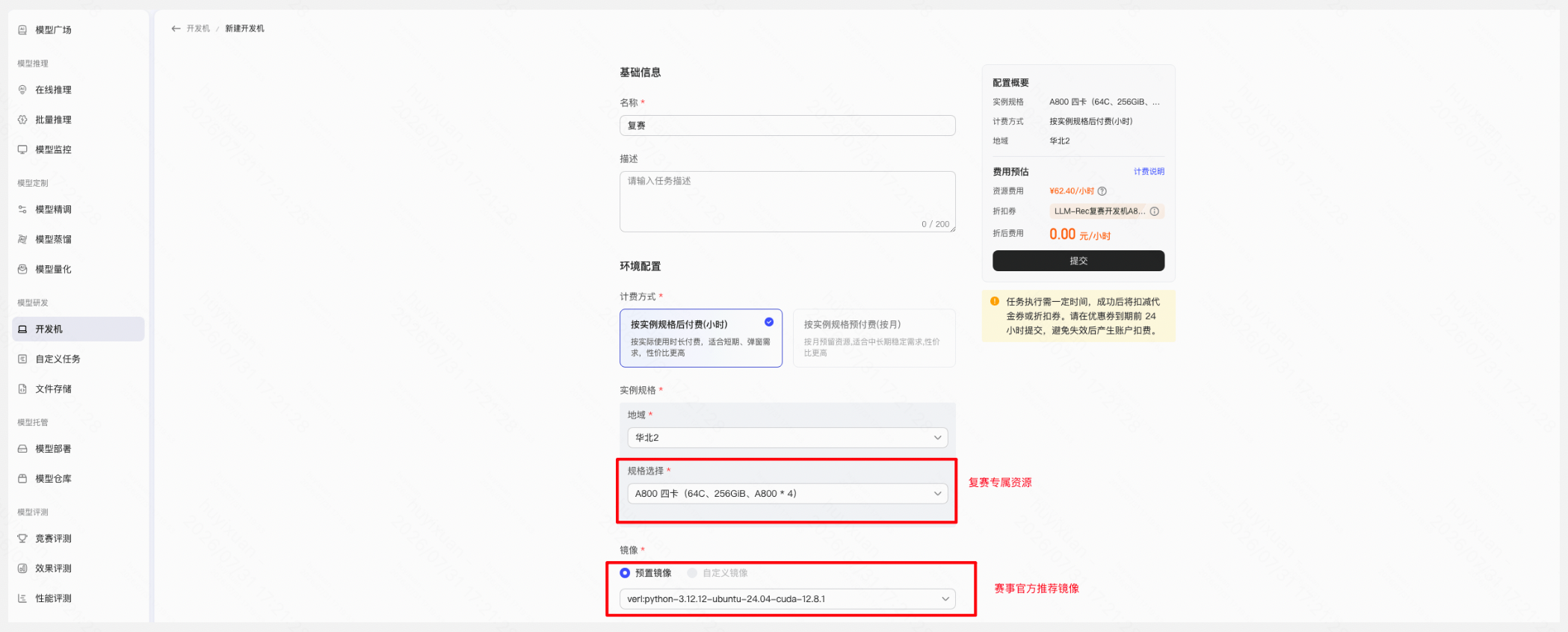
创建开发机,选择官方镜像
复赛平台提供A800四卡赛事专属资源,复赛代金券可自动抵扣1台30天账单消耗,超出时长或数量需选手按限时折扣自费,请及时使用并关注资源消耗。
官方推荐镜像 verl:python-3.12.12-ubuntu-24.04-cuda-12.8.1
也可使用 llamafactory:3.11.14-ubuntu-22.04-cuda-12.4.1
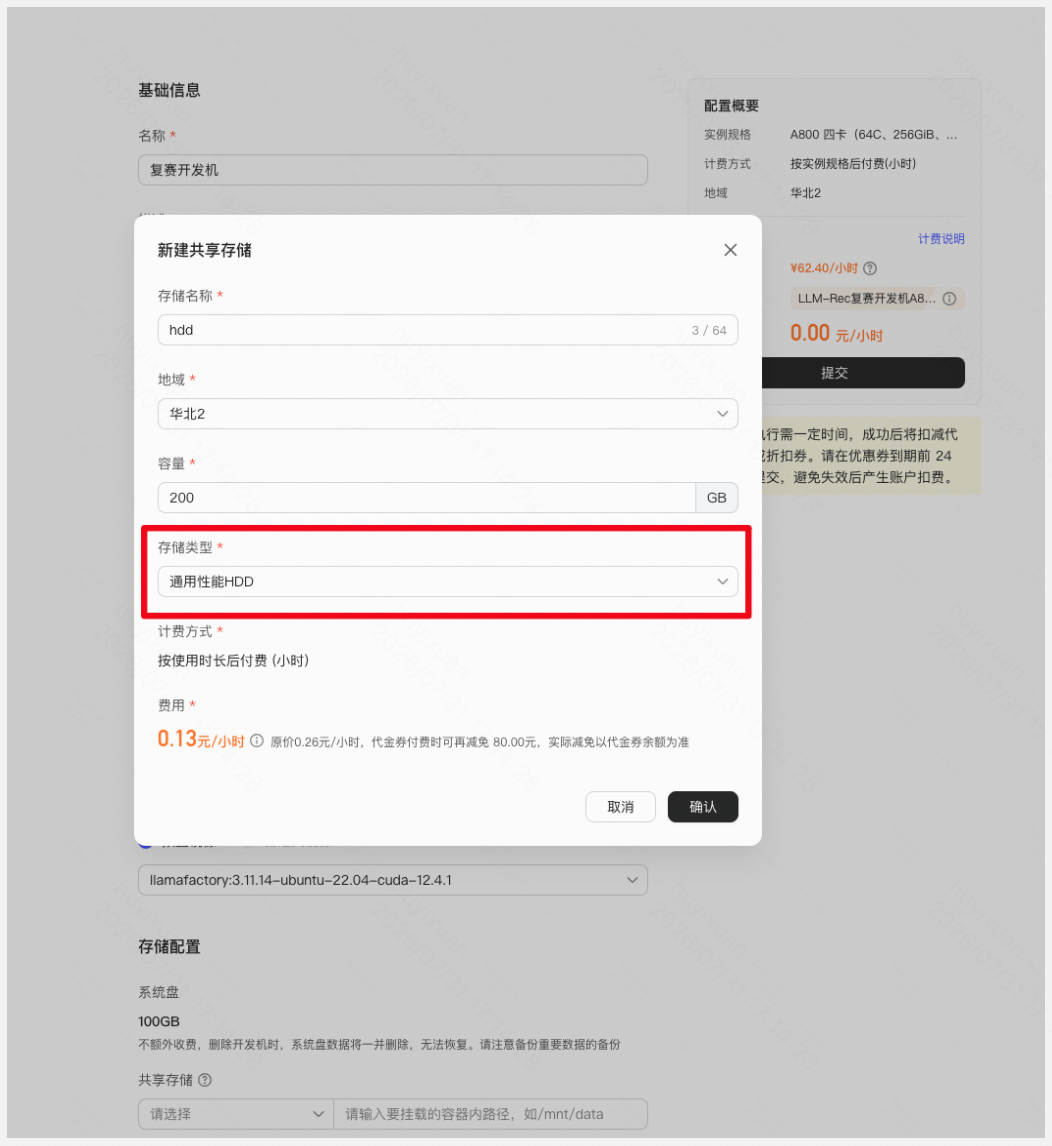
新建存储,选择通用性能HDD
平台为每个队伍提供一张KFS-通用性能HDD 代金券,代金券额度80元 (可覆盖200GB存储1.5个月)
说明:注意不要使用SDD,比赛结束后及时清理资源,避免产生费用
进入开发机,配置SSH登陆
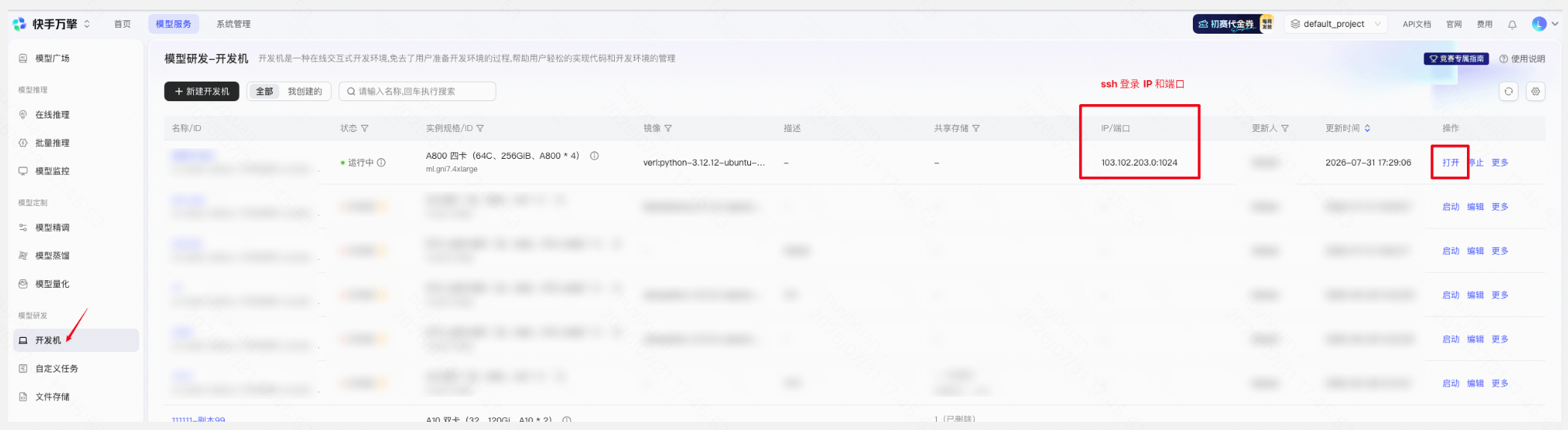
点击“打开”进入开发机,通过passwd命令设置root用户的密码:

成功设置root密码后,就可以本地通过ssh登陆开发机,例如:
ssh root@103.102.203.0 -p 1039
其中103.102.203.0和1039可以在用户的开发机列表页的“IP/端口”一栏看到。
使用开发机训练模型
以下介绍官方推荐镜像的llamafactory框架训练onerec模型的流程。
下载开源数据集
huggingface-cli download \
    --repo-type dataset OpenOneRec/Explorer_LLM_Rec_Competition \
    --local-dir /workspace/hf_data/explorer_llm_rec_competition
或者直接使用本地数据集:
ls /data/data/
inspect_parquet.py  rank116-1.parquet  rank17-0.parquet   rank223-0.parquet  rank30-12.parquet  rank44-0.parquet   rank58-0.parquet   rank74-8.parquet
rank0-0.parquet     rank118-1.parquet  rank19-0.parquet   rank226-0.parquet  rank31-0.parquet   rank45-0.parquet   rank58-3.parquet   rank76-1.parquet
rank0-1.parquet     rank12-0.parquet   rank19-6.parquet   rank23-0.parquet   rank35-0.parquet   rank47-1.parquet   rank6-0.parquet    rank79-0.parquet
rank1-2.parquet     rank120-3.parquet  rank198-0.parquet  rank24-0.parquet   rank35-5.parquet   rank48-11.parquet  rank60-0.parquet   rank79-1.parquet
rank100-0.parquet   rank123-2.parquet  rank2-0.parquet    rank244-0.parquet  rank38-0.parquet   rank48-5.parquet   rank62-0.parquet   rank79-2.parquet
rank101-0.parquet   rank127-9.parquet  rank20-1.parquet   rank25-0.parquet   rank4-0.parquet    rank5-0.parquet    rank62-11.parquet  rank8-6.parquet
rank103-0.parquet   rank14-11.parquet  rank205-0.parquet  rank26-0.parquet   rank4-1.parquet    rank5-6.parquet    rank65-0.parquet   rank83-2.parquet
rank104-0.parquet   rank143-0.parquet  rank21-0.parquet   rank26-1.parquet   rank40-0.parquet   rank50-0.parquet   rank7-0.parquet    rank84-0.parquet
rank108-1.parquet   rank15-0.parquet   rank21-10.parquet  rank28-0.parquet   rank40-3.parquet   rank52-2.parquet   rank7-10.parquet   rank87-5.parquet
rank11-0.parquet    rank15-1.parquet   rank217-0.parquet  rank29-0.parquet   rank41-1.parquet   rank53-0.parquet   rank70-3.parquet   rank92-0.parquet
rank111-1.parquet   rank16-0.parquet   rank22-0.parquet   rank30-11.parquet  rank42-1.parquet   rank55-0.parquet   rank72-2.parquet
convert数据集(包括think标签)
#!/usr/bin/env python3
"""parquet → Alpaca JSONL 转换器 v2 (列兼容版)

跟原始 convert_v2.py 的差异:
- 去掉 source 字段(避免 None/null 导致 datasets 类型推断失败)
- history 始终写出(空列表也写,避免列不一致)

【用法】
    python3 convert.py --input parquet_dir --output data.jsonl
"""
import argparse
import collections
import json
import re
import sys
from pathlib import Path

import pandas as pd


_TOKENS_TO_DELETE = [
    "<|sid_end|>",
    "<|goods_sid_end|>",
    "<|living_end|>",
    "<|ad_end|>",
    "<|prod_end|>",
    "<|video_end|>",
]

_TOKENS_TO_NORMALIZE = [
    ("<|live_begin|>", "<|living_begin|>"),
    ("<prod_s_", "<s_"),
    ("<|pid_video_begin|>",  "<pid_video_begin>"),
    ("<|pid_video_end|>",    "<pid_video_end>"),
    ("<|pid_ad_begin|>",     "<pid_ad_begin>"),
    ("<|pid_ad_end|>",       "<pid_ad_end>"),
    ("<|pid_prod_begin|>",   "<pid_prod_begin>"),
    ("<|pid_prod_end|>",     "<pid_prod_end>"),
    ("<|pid_living_begin|>", "<pid_living_begin>"),
    ("<|pid_living_end|>",   "<pid_living_end>"),
]

_ITEMIC_TOKEN_RE = re.compile(r"<s_([a-z])_\d+>")


def filter_sid_end_tokens(text: str, stats: dict | None = None) -> str:
    for tok in _TOKENS_TO_DELETE:
        if tok in text:
            if stats is not None:
                stats[f"delete:{tok}"] += text.count(tok)
            text = text.replace(tok, "")
    for src, dst in _TOKENS_TO_NORMALIZE:
        if src in text:
            if stats is not None:
                stats[f"normalize:{src}"] += text.count(src)
            text = text.replace(src, dst)
    return text


def check_itemic_token_types(text: str, max_token_types: int) -> tuple[bool, set]:
    found = set(_ITEMIC_TOKEN_RE.findall(text))
    return len(found) <= max_token_types, found


# --------------------------------------------------------------------------- #
#  Pre-processing
# --------------------------------------------------------------------------- #

def convert_messages(messages: list, add_think_pattern: bool,
                     do_filter_sid: bool, stats: dict | None) -> list:
    msg_list = []
    for msg in messages:
        role = msg["role"]
        content = msg["content"]

        if isinstance(content, str):
            text = content
        elif isinstance(content, dict) and content.get("type") == "text":
            text = content["text"]
        elif isinstance(content, list):
            text = "".join(
                c["text"] if isinstance(c, dict) and c.get("type") == "text" else c
                for c in content
                if isinstance(c, (str, dict))
            )
        else:
            raise ValueError(f"Unsupported content type: {type(content)}, value={content!r}")

        if do_filter_sid:
            text = filter_sid_end_tokens(text, stats)

        msg_list.append({"role": role, "content": text})

    if add_think_pattern:
        for i, msg in enumerate(msg_list):
            if msg["role"] != "assistant":
                continue
            user_idx = i - 1
            if user_idx < 0 or msg_list[user_idx]["role"] != "user":
                continue

            match = re.search(r"<think>(.*?)</think>", msg["content"], re.DOTALL)
            if match is None:
                msg_list[user_idx]["content"] += "/no_think"
                msg_list[i]["content"] = "<think>\n</think>\n" + msg["content"]
                if stats is not None:
                    stats["think:inject_empty"] += 1
            elif match.group(1).strip():
                msg_list[user_idx]["content"] += "/think"
                if stats is not None:
                    stats["think:keep_existing"] += 1
            else:
                msg_list[user_idx]["content"] += "/no_think"
                if stats is not None:
                    stats["think:empty_tag"] += 1

    return msg_list


def to_alpaca(msg_list: list) -> dict:
    instruction = ""
    for msg in msg_list:
        if msg["role"] == "system":
            instruction = msg["content"]
            break

    user_messages = []
    assistant_messages = []

    for msg in msg_list:
        if msg["role"] in ("user", "human"):
            user_messages.append(msg["content"])
        elif msg["role"] == "assistant":
            assistant_messages.append(msg["content"])

    if not user_messages or not assistant_messages:
        return None

    input_text = user_messages[0]
    output_text = assistant_messages[-1]

    record = {
        "instruction": instruction,
        "input": input_text,
        "output": output_text,
        "history": [],
    }

    if len(user_messages) > 1 or len(assistant_messages) > 1:
        num_history_pairs = min(len(user_messages) - 1, len(assistant_messages))
        for i in range(num_history_pairs):
            record["history"].append([user_messages[i], assistant_messages[i]])

    return record


# --------------------------------------------------------------------------- #
#  Main
# --------------------------------------------------------------------------- #

def process_parquet(path: str, args, stats: dict) -> list:
    df = pd.read_parquet(path)
    records = []
    skipped = 0
    dropped_itemic = 0

    for _, row in df.iterrows():
        raw = row.get("messages")
        if raw is None or isinstance(raw, float):
            skipped += 1
            continue

        try:
            messages = json.loads(raw) if isinstance(raw, str) else raw
            msg_list = convert_messages(
                messages,
                add_think_pattern=args.add_think_pattern,
                do_filter_sid=args.filter_sid_tokens,
                stats=stats,
            )

            if args.max_token_types is not None:
                full_text = "".join(m["content"] for m in msg_list)
                ok, found = check_itemic_token_types(full_text, args.max_token_types)
                if not ok:
                    dropped_itemic += 1
                    stats["dropped:itemic_overflow"] += 1
                    stats[f"itemic_set:{','.join(sorted(found))}"] += 1
                    continue

            records.append(to_alpaca(msg_list))

        except Exception as e:
            print(f"[WARN] skipping row due to: {e}", file=sys.stderr)
            skipped += 1

    print(f"[INFO] {path}: {len(records)} converted, {skipped} skipped, {dropped_itemic} dropped(itemic)",
          file=sys.stderr)
    return records


def main():
    parser = argparse.ArgumentParser()
    parser.add_argument("--input", nargs="+", required=True,
                        help="parquet 文件或目录或 glob")
    parser.add_argument("--output", required=True, help="输出 jsonl 路径")
    parser.add_argument("--max_token_types", type=int, default=3,
                        help="允许 <s_X_> 字母种类数(默认 3 = a/b/c)。设 None 关闭检查")
    parser.add_argument("--no_filter_sid_tokens", dest="filter_sid_tokens", action="store_false")
    parser.add_argument("--no_add_think_pattern", dest="add_think_pattern", action="store_false")
    parser.add_argument("--report", action="store_true", help="打印变换统计")
    parser.set_defaults(filter_sid_tokens=True, add_think_pattern=True)
    args = parser.parse_args()

    stats = collections.Counter()

    all_records = []
    for pattern in args.input:
        if "*" in pattern:
            from glob import glob
            paths = sorted(glob(pattern, recursive=True))
            paths = [Path(p) for p in paths]
        else:
            p = Path(pattern)
            if p.is_dir():
                paths = sorted(p.rglob("*.parquet"))
            else:
                paths = [p]
        for p in paths:
            all_records.extend(process_parquet(str(p), args, stats))

    first_hist_idx = next((i for i, r in enumerate(all_records) if r and r.get("history")), None)
    if first_hist_idx is not None and first_hist_idx > 0:
        all_records.insert(0, all_records.pop(first_hist_idx))
        print(f"[INFO] moved record {first_hist_idx} to front (has history, avoids datasets null-type inference)", file=sys.stderr)

    Path(args.output).parent.mkdir(parents=True, exist_ok=True)
    with open(args.output, "w", encoding="utf-8") as f:
        for record in all_records:
            f.write(json.dumps(record, ensure_ascii=False) + "\n")

    print(f"\n[OK] Written {len(all_records)} samples to {args.output}", file=sys.stderr)

    if args.report:
        print("\n=== 统计报告 ===", file=sys.stderr)
        print(f"\n[token filter 命中次数]", file=sys.stderr)
        for k in sorted(stats.keys()):
            if k.startswith(("delete:", "normalize:")):
                print(f"  {k:<45} {stats[k]:>10,}", file=sys.stderr)
        print(f"\n[think pattern 注入次数]", file=sys.stderr)
        for k in sorted(stats.keys()):
            if k.startswith("think:"):
                print(f"  {k:<45} {stats[k]:>10,}", file=sys.stderr)
        print(f"\n[itemic 字母种类超限丢弃]", file=sys.stderr)
        print(f"  dropped:itemic_overflow             {stats.get('dropped:itemic_overflow', 0):>10,}",
              file=sys.stderr)
        top_sets = [(k.split(":", 1)[1], v) for k, v in stats.items() if k.startswith("itemic_set:")]
        if top_sets:
            print(f"\n  丢弃样本的 itemic 字母组合(top 10):", file=sys.stderr)
            for s, n in sorted(top_sets, key=lambda x: -x[1])[:10]:
                print(f"    {{ {s} }}  →  {n:,} 条", file=sys.stderr)


if __name__ == "__main__":
    main()
将以上脚本存放于:/data/scripts/convert_v2.py
执行转换:
mkdir -p /data/scripts/lf_data
python3 /data/scripts/convert_v2.py \
  --input /data/data \
  --output /data/lf_data/biz_sft_1b.jsonl \
    --report     # 打印清洗/丢弃统计
注册自定义数据集
python3 - <<'EOF'
import json, pathlib

fp = pathlib.Path("/app/LLaMA-Factory/data/dataset_info.json")
info = json.loads(fp.read_text())

info["biz_sft"] = {
    "file_name": "/data/lf_data/biz_sft_1b.jsonl",
    "formatting": "alpaca",
    "columns": {
        "prompt": "instruction",
        "query": "input",
        "response": "output",
        "history": "history",
    },
}

fp.write_text(json.dumps(info, indent=2, ensure_ascii=False))
print("registered biz_sft (alpaca)")
EOF
(可选)训练优化
安装flash-attn2和liger kernel,可以节省训练显存开销。
pip install \
    https://ghfast.top/https://github.com/Dao-AILab/flash-attention/releases/download/v2.7.4.post1/flash_attn-2.7.4.post1+cu12torch2.5cxx11abiFALSE-cp311-cp311-linux_x86_64.whl
pip install "transformers==4.56.2" --force-reinstall --no-deps
pip install liger-kernel
pip install "huggingface-hub==0.34.5" --no-deps --force-reinstall
单卡配置
以下是lora微调的配置,假设模型路径:/data/models/converted。
mkdir -p /workspace/lf_configs
cat > /workspace/lf_configs/biz_sft.yaml <<'YAML'
### model
model_name_or_path: /data/models/converted
trust_remote_code: true
flash_attn: fa2

### method
stage: sft
do_train: true
finetuning_type: lora
lora_target: all
lora_rank: 16
lora_alpha: 32
lora_dropout: 0.05
enable_liger_kernel: true

### dataset
dataset: biz_sft
template: qwen3_nothink
cutoff_len: 32768
packing: true
neat_packing: true
preprocessing_num_workers: 4
overwrite_cache: true

### output
output_dir: /workspace/lf_outputs/biz_sft_lora
logging_steps: 1
save_steps: 3000
save_total_limit: 30
plot_loss: true
overwrite_output_dir: true

### train
num_train_epochs: 1.0
per_device_train_batch_size: 1
gradient_accumulation_steps: 4
learning_rate: 2.0e-4
lr_scheduler_type: cosine
warmup_ratio: 0.03
weight_decay: 0.0
bf16: true
gradient_checkpointing: true
seed: 19260817
YAML
全参训练配置:
mkdir -p /workspace/lf_configs
cat > /workspace/lf_configs/biz_sft_full.yaml <<'YAML'
### model
model_name_or_path: /data/models/converted
trust_remote_code: true
flash_attn: fa2

### method
stage: sft
do_train: true
finetuning_type: full
enable_liger_kernel: true

### dataset
dataset: biz_sft
template: qwen3_nothink
cutoff_len: 32768
packing: true
neat_packing: true
preprocessing_num_workers: 4
overwrite_cache: true

### output
output_dir: /workspace/lf_outputs/biz_sft_full
logging_steps: 1
save_steps: 3000
save_total_limit: 30
plot_loss: true
overwrite_output_dir: true

### train
num_train_epochs: 1.0
per_device_train_batch_size: 1
gradient_accumulation_steps: 4
learning_rate: 2.0e-5
lr_scheduler_type: cosine
warmup_ratio: 0.03
weight_decay: 0.0
bf16: true
gradient_checkpointing: true
seed: 19260817
YAML
单卡跑训练
unset LD_PRELOAD http_proxy https_proxy
mkdir -p /workspace/lf_outputs/biz_sft_lora
cd /app/LLaMA-Factory

nohup env \
    PYTHONUNBUFFERED=1 \
    TQDM_DISABLE=1 \
    CUDA_VISIBLE_DEVICES=0 \
    HF_HUB_OFFLINE=1 \
    PYTORCH_CUDA_ALLOC_CONF=expandable_segments:True \
    llamafactory-cli train /workspace/lf_configs/biz_sft.yaml \
    > /workspace/lf_outputs/biz_sft_lora/train.log 2>&1 &
scp拷贝模型权重
模型训练出来的权重可以通过scp的方式从开发机拷贝到本地,例如:
# 从远端拉到本地当前目录,IP和端口从自己的开发机列表查看,(. 可换成你想存的路径)
scp -r -P 1022 root@103.102.203.0:/data/ ./
上传模型
操作路径: 左侧导航栏「模型仓库」→ 点击「上传模型」
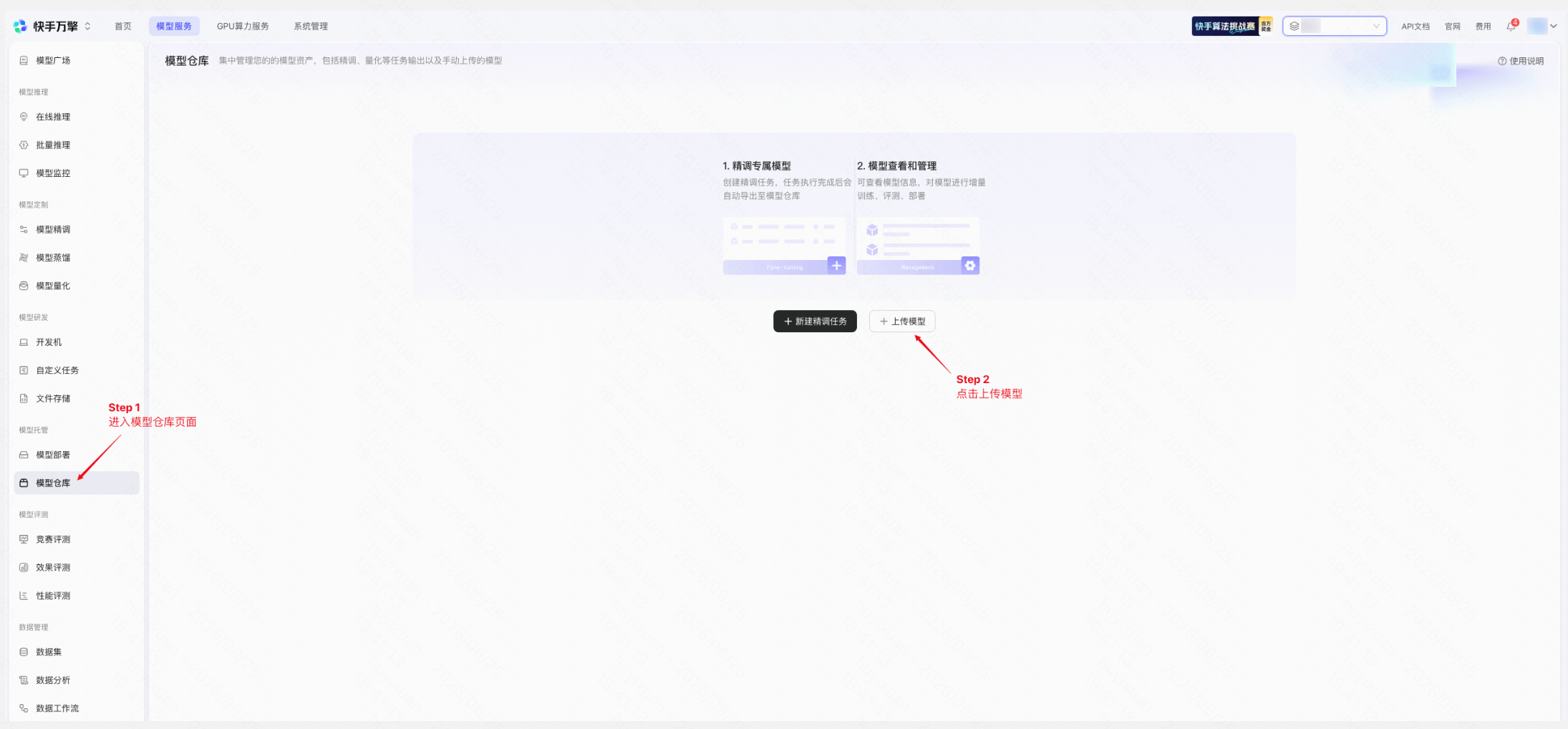
上传模型 | 平台页面示例 |
|
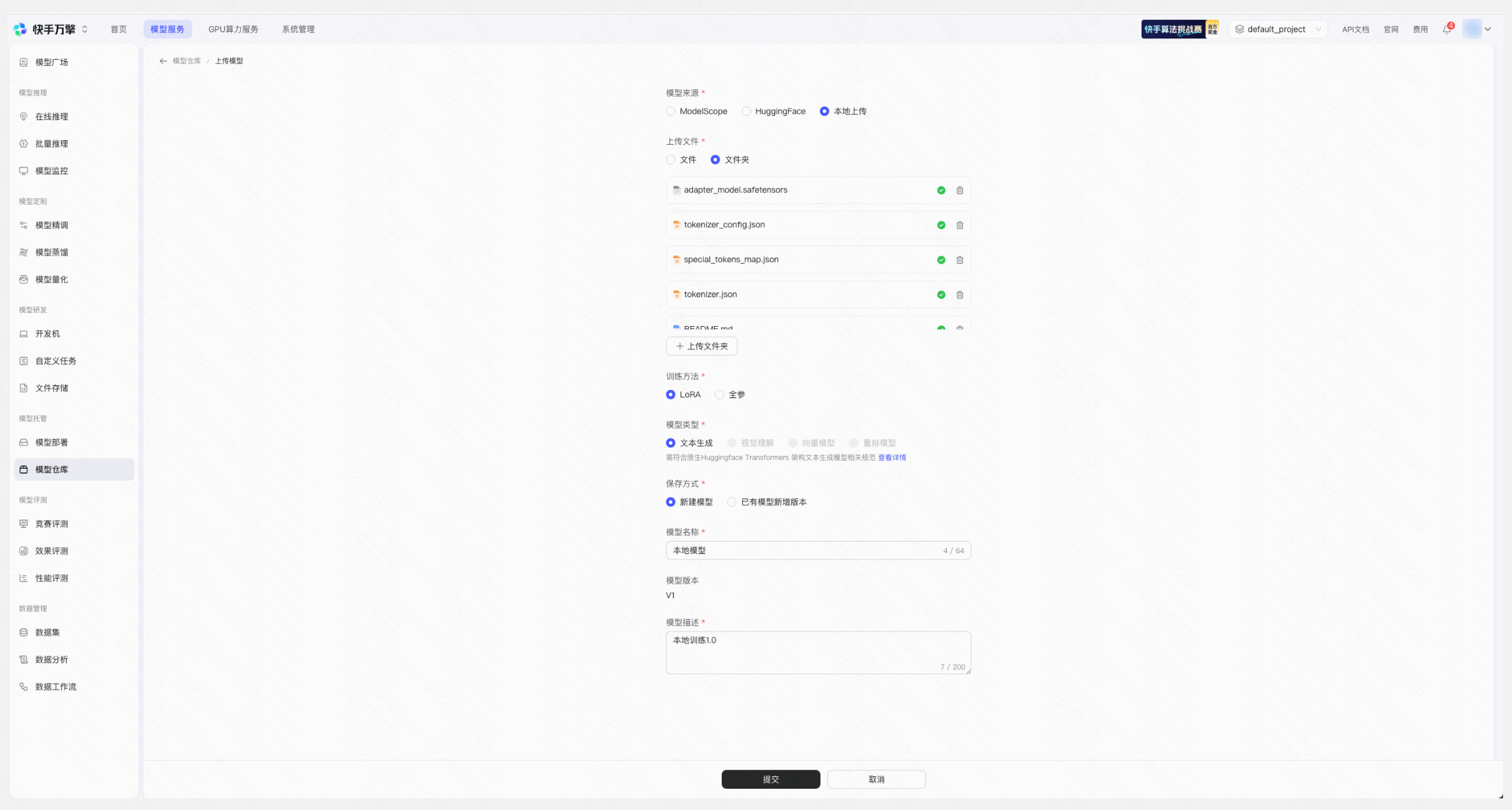
若需使用万擎平台模型精调训练、竞赛评测能力,请参考:快手探索者 LLM-Rec 挑战赛 · 万擎平台介绍 第四部分
该篇文档内容是否对您有帮助?
有帮助没帮助